SSH as a Proxy for Access Control
I’ve been using the same DNS host for many years. In that time they’ve added exactly one feature that I care about: an API for responding to ACME DNS challenges.
This API has no concept of access control. If you have the API key, you can get an SSL certificate for any of my domains.
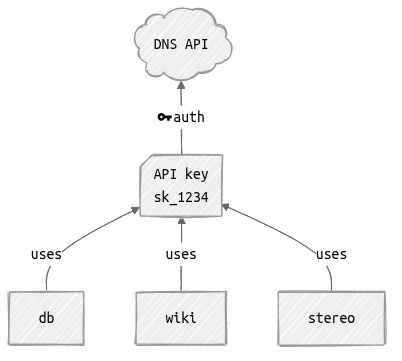
This is no good.
One way to improve this is to set up a proxy that holds the key and adds access control. This is a simple HTTP API - we could easily wrap it with a custom proxy, or put together a Caddy configuration. Running this in an isolated VM would provide much better control over who can execute what.
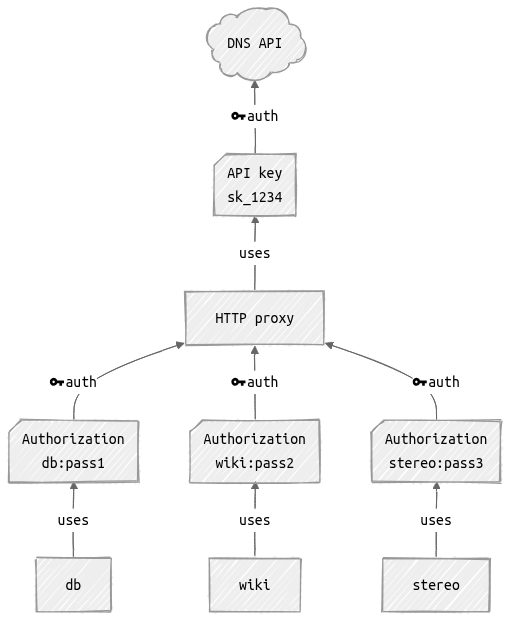
But we’re going to do something a little different: we’re going to use OpenSSH as our proxy.
Tradeoffs
I’d be a liar if I said this was a purely rational decision. It has some advantages:
- configuration fatigue. I don’t want to spend more time peering at reverse proxy documentation.
- generality. This approach can be easily adapted to other purposes.
- surface area. I’m already running OpenSSH ~everywhere. The flow of execution is very simple.
And some disadvantages:
- security. Our secure host has a real user, who is accessible via SSH, who can access the API key. We’re going to add restrictions on this, but a bug there would completely defeat the purpose.
- efficiency. I imagine this would be a poor approach for high-traffic endpoints. This is irrelevant for this use case.
How?
All my hosts are running NixOS, which provides options for generating certificates. Under the hood this uses lego.
lego can respond to DNS challenges using an external command to manipulate DNS records.
When you grant access to a client key using the OpenSSH authorized_keys file, you can specify a command that will be executed instead of what the client requested.
This gives us everything that we need:
- lego on the client requests a certificate using a DNS-01 challenge.
-
it executes an external command to respond to the challenge:
ssh acme-proxy -- present _acme-challenge.wiki.diffeq.com au1Oag4U... -
sshd on acme-proxy maps the client’s key to a command.
this command validates that the client has access to the requested domain, and passes the request on to the DNS API.
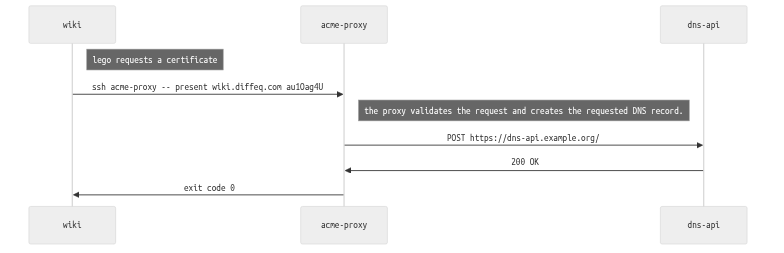
The neat thing about this is that delegating the command via SSH is transparent; if you already have a command that works with Lego then you can drop it right in.
(Future extension: it would be handy to have a wrapper that could execute an acme.sh plugin, or one of lego’s built-in DNS providers.)
NixOS modules
The final implementation is quite simple (about 2 dozen lines of bash); it’s just a matter of putting it all in place on the host & clients. NixOS is excellent for this kind of glue.
I’ve published a flake with NixOS modules for implementing this: acme-dns-by-proxy.
Sample configuration:
# client.nix
imports = [ inputs.acme-dns-by-proxy.nixosModules.client ];

security.acme.certs."wiki.example.org" = {};
security.acme.dnsChallengeProxies."wiki.example.org" = {
  host = "acme-proxy.example.org";
  sshIdentity = "/run/secrets/client-ssh-key";
  hostKey = "ssh-ed25519 AAAA..."; # acme-proxy's host key
};
# acme-proxy.nix
imports = [ inputs.acme-dns-by-proxy.nixosModules.host ];
services.acme-dns-proxy-host = let
# see lego External Program documentation:
# https://go-acme.github.io/lego/dns/exec/index.html
modify-dns = pkgs.writeShellScript "modify-dns.sh" ''
if [ "$1" = "present" ]; then
# create the requested DNS entry
else
# delete the requested DNS entry
fi
'';
in {
enable = true;
domains = [
{
domain = "wiki.example.org";
pubKey = "ssh-ed25519 AAAA..."; # the client's SSH key;
execCommand = modify-dns;
}
];
};